Sanitized engineering pattern
Controlled File Delivery with Flask, Redis and Nginx
A sanitized engineering pattern for controlled file delivery using Flask, Redis, Gunicorn, systemd, Nginx, and X-Accel-Redirect.
Sanitized engineering pattern — This study describes a reusable engineering design derived from a real implementation. Production-specific identifiers, infrastructure values, and policy details are intentionally excluded.
Overview
Direct static downloads are simple, but they do not provide a useful place to apply per-client policy before a file is transferred. This pattern separates those concerns.
Flask evaluates the request, requested file, and client policy. Redis maintains download state. Nginx remains responsible for the actual file transfer after Flask approves the request. Gunicorn serves the application locally, and systemd manages its lifecycle.
Policy
Flask validates the request and applies per-client, per-file download rules.
State
Redis stores counters and reset timestamps for each client and requested file.
Delivery
Nginx transfers approved files from a protected internal location.
Architecture
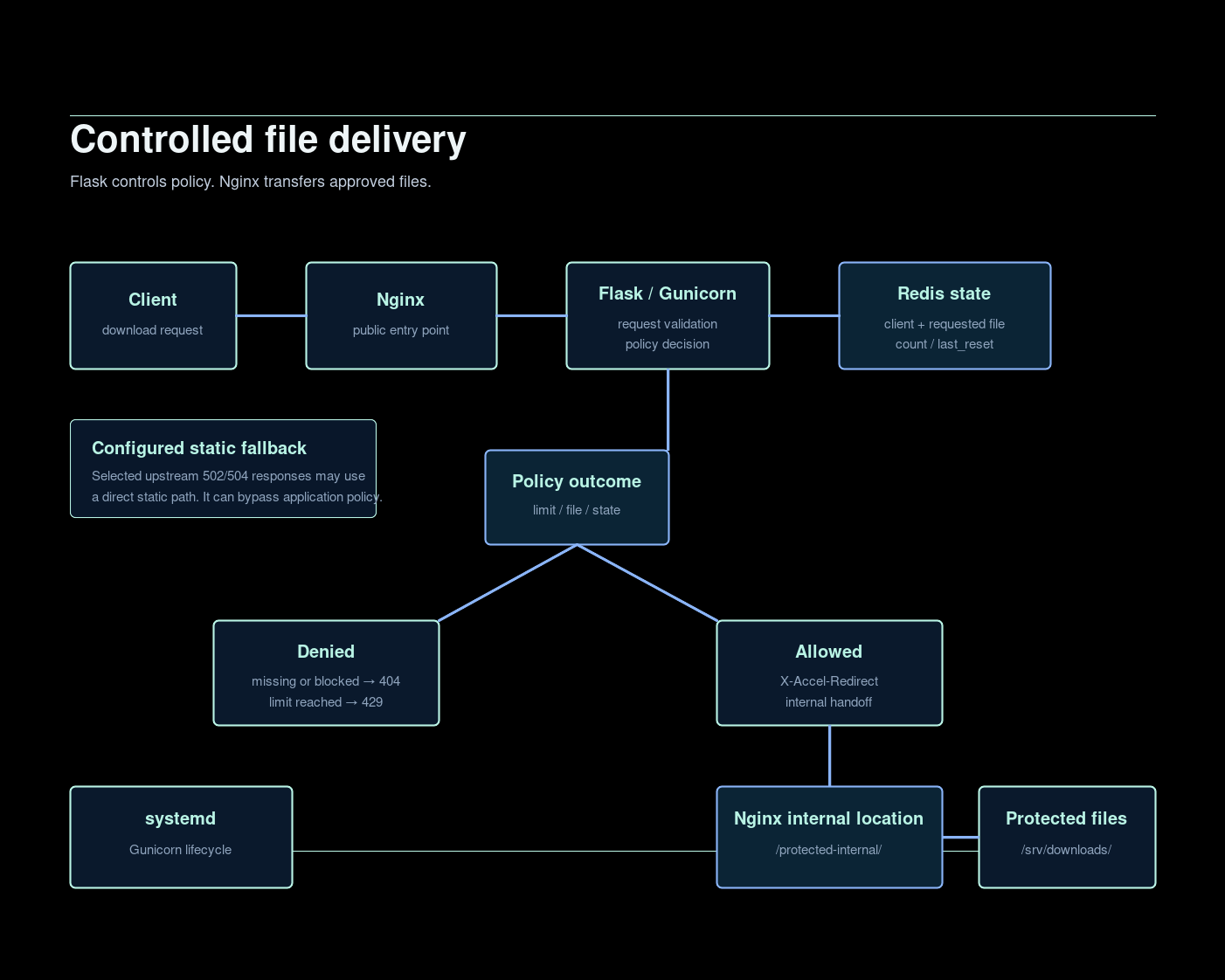
The important boundary is deliberate: the application does not need to stream a large file after it has made a decision. It returns an internal handoff instruction, and Nginx serves the file from protected storage.
Request and download flow
- A client requests a named file through the public Nginx endpoint.
- Nginx forwards the request to Flask through a local Gunicorn listener.
- Flask validates the filename and checks that the requested file exists below the configured download root.
- Flask resolves the client policy and reads Redis state for that client and file.
- A denied request returns HTTP 404 or HTTP 429; an approved request returns X-Accel-Redirect.
- Nginx performs the internal transfer from /srv/downloads/.
Implementation walkthrough
The implementation was assembled in layers so each dependency could be validated before testing the complete download path. The commands below are a sanitized reference layout, not a statement of the original production paths or configuration.
Directory layout
/opt/file-policy-app/
├── app.py
├── allow-ip-limits.txt
└── venv/

/srv/downloads/

/etc/systemd/system/flask-app.service
/etc/nginx/conf.d/controlled-file-delivery.conf
The application directory holds the Flask policy layer and its isolated Python environment. The download root is separate and is exposed only through Nginx’s internal location.
Service setup
- Install the local runtime dependencies using the distribution’s package-management process, then create the application and protected storage directories.
sudo mkdir -p /opt/file-policy-app
sudo mkdir -p /srv/downloads
python3 -m venv /opt/file-policy-app/venv
source /opt/file-policy-app/venv/bin/activate
pip install flask gunicorn redis
- Place the Flask application at
/opt/file-policy-app/app.pyand create/opt/file-policy-app/allow-ip-limits.txt. The application is the policy decision layer; the policy file provides a small, controlled set of client-specific limits.
192.0.2.10=10
192.0.2.20=-1
192.0.2.30=0
192.0.2.40=5
Positive values set a maximum download count, -1 permits unlimited access, and 0 blocks delivery. Clients without a specific entry use the configured default policy. View sanitized app.py ↗ · View policy example ↗
- Bring Redis online independently, then confirm it responds before involving the web request path.
sudo systemctl enable --now redis
redis-cli ping
- Test Flask and Gunicorn locally before publishing a reverse proxy. The application service stays local behind Nginx.
cd /opt/file-policy-app
gunicorn --bind 127.0.0.1:5000 app:app
ss -lntp | grep 5000
curl -I http://127.0.0.1:5000/download/example-file.gz
- Create
/etc/systemd/system/flask-app.servicefor Gunicorn lifecycle management. Reload systemd before enabling the service, then inspect its state and journal if startup fails.
sudo systemctl daemon-reload
sudo systemctl enable --now flask-app
sudo systemctl status flask-app
journalctl -u flask-app -f
The public reference unit uses a dedicated service account as a reusable hardening pattern. View systemd unit ↗
Nginx setup
- Create
/etc/nginx/conf.d/controlled-file-delivery.conf. It is responsible for the public reverse proxy, the protected X-Accel-Redirect location, and the selected upstream fallback behavior. The example keeps Gunicorn on127.0.0.1:5000and maps the protected path to/srv/downloads/.
location /protected-internal/ {
    internal;
    alias /srv/downloads/;
}
-
If a 502/504 static fallback is intentionally retained, treat it as configured degraded/static fallback behavior. It can bypass application policy, so a stricter requirement may instead fail closed. View Nginx configuration ↗
-
Validate configuration before reloading Nginx, then test the complete HTTP path through the documentation-only hostname.
sudo nginx -t
sudo systemctl reload nginx
curl -I https://downloads.example.invalid/download/example-file.gz
Operational validation
The final checks follow the same dependency order used during assembly: Redis state, Gunicorn listener and service lifecycle, Nginx syntax and upstream behavior, then the full request path. During troubleshooting, inspect the service journal, Nginx error logs, filesystem ownership, policy-file syntax, and forwarded client-address handling before changing configuration.
Per-client download policy
A small policy file can hold client-specific limits. The public reference uses documentation-only addresses:
192.0.2.10=10
192.0.2.20=-1
192.0.2.30=0
192.0.2.40=5
A positive value is the maximum number of downloads. -1 means unlimited access. 0 blocks the client. A client without a custom entry uses the configured default limit.
This keeps policy readable while allowing the enforcement logic to stay in the application layer rather than in a public static location.
Redis-backed state tracking
State is maintained per client + requested file, not as one global client counter. Relevant values are:
- count — downloads recorded within the active window.
- last_reset — when the current counter window began.
This means one file does not consume the policy allowance for another. The public reference uses a Redis hash for each state key and handles Redis connectivity as an application dependency.
Counter reset behavior
Counters reset under two conditions:
- The configured interval reaches four hours (14400 seconds).
- The underlying file modification time is newer than the previous reset timestamp.
The file-update condition allows a changed file to begin a fresh download window. The implementation checks this before incrementing the counter for an allowed request.
Efficient file delivery with X-Accel-Redirect
Flask performs validation and policy work, then returns an internal redirect rather than opening and streaming the file itself:
response.headers["X-Accel-Redirect"] = f"/protected-internal/{filename}"
Nginx receives that internal redirect and transfers the approved file. The protected location is not directly reachable from the public internet:
location /protected-internal/ {
    internal;
    alias /srv/downloads/;
}
This preserves a clean responsibility boundary: Flask decides; Nginx transfers.
Nginx reverse proxy and internal file delivery
Nginx is the public entry point and passes application requests to Gunicorn on loopback. It forwards the original client address through trusted proxy headers and keeps the protected file location internal.
The reusable reference includes sensible proxy timeouts, hidden-file protection, and comments around the selected upstream fallback path. The example hostname is downloads.example.invalid; it is documentation-only.
Gunicorn and systemd service management
Gunicorn binds Flask to 127.0.0.1:5000, so Nginx remains the only public HTTP entry point. systemd provides start, restart, dependency, and journal-management behavior.
The supplied public service file uses a dedicated filedelivery account as a recommended reusable hardening pattern. It does not claim that every original implementation used that account.
Failure and degraded behavior
The reference configuration can use a configured static fallback for selected 502 and 504 upstream failures. This is degraded/static fallback behavior, not an availability guarantee.
A direct static fallback can preserve file delivery when the application upstream is unavailable, but it can bypass application-level policy enforcement. Depending on the security or business requirement, a stricter deployment may choose to fail closed instead. This is an engineering trade-off, not a claim that the original implementation was changed.
If Redis is unavailable, policy enforcement should be treated as an application dependency failure. Missing or invalid file requests return HTTP 404; a reached download limit returns HTTP 429.
Validation and troubleshooting
Validation should be performed layer by layer:
redis-cli ping
systemctl status flask-app
ss -lntp | grep 5000
nginx -t
curl -I http://127.0.0.1:5000/download/example-file.gz
curl -I https://downloads.example.invalid/download/example-file.gz
Useful investigation points include the Gunicorn service state, Redis connectivity, virtual-environment path, Nginx upstream errors, filesystem permissions, internal alias behavior, forwarded client IP handling, and policy-file syntax.
Security and operational considerations
The public pattern recommends a dedicated service account, least-privilege read access to the download directory, loopback-only Gunicorn, a protected Nginx internal location, restricted Redis exposure, controlled policy-file ownership, and monitoring for repeated 429 responses and service errors.
Filename validation is essential: the application must reject absolute paths, traversal segments, hidden paths, and values that resolve outside /srv/downloads/.
Engineering outcome
This pattern makes the policy and transfer responsibilities inspectable:
- Flask controls request validation and policy decisions.
- Redis records per-client, per-file state.
- Nginx handles public entry, reverse proxying, protected internal delivery, and access/error logging.
- Gunicorn and systemd provide local application serving and lifecycle management.
What this demonstrates
Linux delivery path
System service management, local application binding, filesystem boundaries, and Nginx configuration.
Policy and state
Flask request handling, client-specific rules, Redis hashes, reset behavior, and HTTP decisions.
Operational judgement
X-Accel-Redirect, reverse-proxy failure modes, fallback trade-offs, validation, and troubleshooting.
Public source
Explore the implementation
Sanitized deployment scripts, Docker configuration, and Nginx examples are available in the public engineering repository.
View implementation on GitHubEngineering discussion
Compare approaches, safely.
Questions and technical feedback are welcome. Public discussion is not enabled yet; use the contact flow for an engineering conversation.
Start a conversation