Public implementation record
Production MCP Application Deployment
A documented Linux deployment workflow that separates Git-managed source, protected runtime files, production promotion, containers, and the HTTPS edge.
Sanitized implementation note — The commands, domains, usernames, repository names, paths, and service names on this page are sanitized examples of the real implementation. Production secrets and company-specific infrastructure are intentionally excluded.
Overview
This work documents a production deployment workflow for a Python-based MCP application on Linux. The aim was to make updates repeatable without manually copying application files or accidentally replacing runtime-specific data.
The deployment path separates Git-managed source from the running production copy, promotes approved files with Rsync, then runs separate web, admin, and scheduler workloads through Docker Compose behind Nginx and HTTPS.
Problem
Updates needed a repeatable path that did not mix source control with protected runtime data.
Approach
Separate source and production directories, then promote reviewed files through scripts and Rsync.
Outcome
A documented deployment workflow with explicit boundaries for source, runtime data, containers, and HTTPS routing.
My role
I worked on the deployment and infrastructure side: preparing the Linux layout, configuring repository access, creating deployment scripts, preserving runtime files during updates, promoting source safely, configuring Docker Compose and Nginx, and verifying the end-to-end workflow.
Architecture
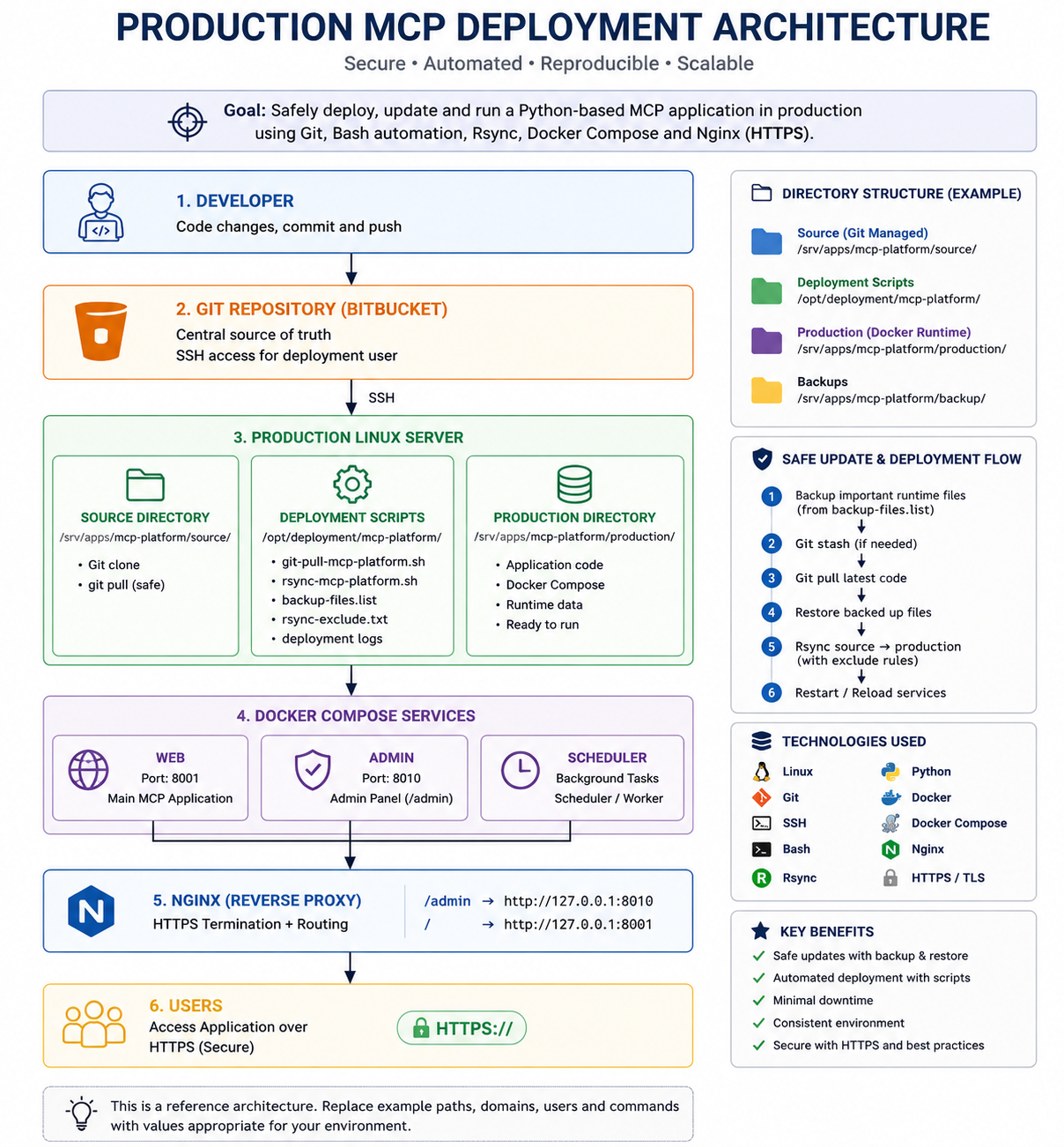
The architecture keeps each responsibility separate:
Git repository → source directory → deployment scripts → production directory
                                                    ↓
                                             Docker Compose
                                  web + admin + scheduler workloads
                                                    ↓
                                           Nginx reverse proxy → HTTPS
Environment and directory structure
A dedicated deployment identity keeps normal repository and application work separate from root. Source, production files, backups, and automation each have a clear home.
sudo useradd -m -s /bin/bash deploysvc
id deploysvc
sudo -iu deploysvc
The first command creates the deployment user; id confirms the expected Linux identity before it is used for repository and SSH operations.
sudo mkdir -p /srv/apps/mcp-platform/source
sudo mkdir -p /srv/apps/mcp-platform/production
sudo mkdir -p /srv/apps/mcp-platform/backup
sudo mkdir -p /opt/deployment/mcp-platform/log-gitdeploy
sudo mkdir -p /opt/deployment/mcp-platform/log-rsync
sudo chown -R deploysvc:deploysvc /srv/apps/mcp-platform /opt/deployment/mcp-platform
ls -ld /srv/apps/mcp-platform/* /opt/deployment/mcp-platform
This prevents source updates, production files, backup material, and deployment logs from becoming an undifferentiated directory tree.
Repository access with SSH
Repository access uses an SSH key owned by the deployment user. Only the public key is added to Bitbucket; the private key remains on the deployment server and is never included in public documentation or scripts.
mkdir -p ~/.ssh
chmod 700 ~/.ssh
ssh-keygen -t ed25519 -C "deploysvc@mcp-platform"
cat ~/.ssh/id_ed25519.pub
ssh -T git@bitbucket.org
The final command tests the SSH trust path before cloning. This avoids putting a Git password in a deployment script.
Source and production separation
The source directory is the Git-managed copy. Production is a separate promoted copy without Git metadata or protected runtime files.
git clone git@bitbucket.org:example-org/mcp-platform.git /srv/apps/mcp-platform/source
cd /srv/apps/mcp-platform/source
git status
git branch
git remote -v
The remote shown above is a sanitized example. Verification confirms that the source working tree, branch, and remote are understood before an update is automated.
Deployment automation
Deployment automation lives outside the repository:
/opt/deployment/mcp-platform/
├── git-pull-mcp-platform.sh
├── rsync-mcp-platform.sh
├── backup-files.list
├── rsync-exclude.txt
├── log-gitdeploy/
└── log-rsync/
backup-files.list identifies runtime material that must survive source updates, such as .env, instance, and data. rsync-exclude.txt prevents those items and .git from being promoted into production.
Safe Git update
/opt/deployment/mcp-platform/git-pull-mcp-platform.sh
cd /srv/apps/mcp-platform/source
git status
git log -1 --oneline
ls -lh /opt/deployment/mcp-platform/log-gitdeploy/
The Git script protects configured runtime files, stashes local changes when needed, pulls the update, restores protected items, and records deployment information. The verification commands make the resulting revision and logs inspectable.
Rsync promotion
/opt/deployment/mcp-platform/rsync-mcp-platform.sh
ls -lah /srv/apps/mcp-platform/production/
ls -lh /opt/deployment/mcp-platform/log-rsync/
Rsync promotes the source tree to the production directory while applying the exclusion rules. That controlled promotion is preferable to mixing Git state and live runtime data in one location.
Docker Compose workloads
The production directory contains the Dockerfile and Compose definition for separate web, admin, and scheduler services.
cd /srv/apps/mcp-platform/production
docker compose build
docker compose up -d
docker compose ps
docker compose logs --tail=100
docker compose ps verifies the intended workloads are running. Targeted logs are available for investigation without treating a restart as the first response to an issue.
Nginx and HTTPS
Nginx terminates HTTPS and routes the main application and /admin path to separate local services.
https://mcp.example.com/
├── /admin → localhost:8010
└── /      → localhost:8001
sudo nginx -t
sudo systemctl reload nginx
sudo certbot --nginx -d mcp.example.com
sudo certbot certificates
Configuration is tested before Nginx is reloaded. The domain is a sanitized example; certificates, verification tokens, and production host details are intentionally excluded.
Verification
Verification starts locally, then follows the public route:
curl -I http://localhost:8001
curl -I http://localhost:8010/admin/
ss -lntp | grep -E '8001|8010'
docker compose ps
sudo nginx -t
curl -I https://mcp.example.com/
curl -I https://mcp.example.com/admin/
These checks validate local application listeners, containers, Nginx syntax, HTTPS routing, and the separate admin path without publishing private verification details.
Repeatable deployment workflow
For a normal update, the sequence stays concise:
/opt/deployment/mcp-platform/git-pull-mcp-platform.sh
/opt/deployment/mcp-platform/rsync-mcp-platform.sh
cd /srv/apps/mcp-platform/production
docker compose up -d --build
docker compose ps
sudo nginx -t
curl -I https://mcp.example.com/
Security decisions
Secrets remain outside Git and outside this public record. That includes .env contents, passwords, tokens, SSH private keys, private repository URLs, internal hostnames, private IP addresses, certificates, and company-specific paths. Protected runtime files are backed up/restored during source updates and excluded from production promotion.
Result and lessons learned
The workflow establishes a clear boundary between Git-managed source and the production application copy. It makes routine deployments scriptable, keeps logs for inspection, and puts configuration validation before traffic-impacting reloads.
Key lessons: keep runtime files separate from code, automate repeatable steps, review Rsync exclusions carefully, retain deployment logs, keep secrets outside Git, and verify Docker and Nginx after every application update.
Technologies
Linux, Git, SSH, Bash, Rsync, Python, Docker, Docker Compose, Nginx, and HTTPS/TLS.
Public source
Explore the implementation
Sanitized deployment scripts, Docker configuration, and Nginx examples are available in the public engineering repository.
View deployment scriptsEngineering discussion
Compare approaches, safely.
Questions and technical feedback are welcome. Public discussion is not enabled yet; use the contact flow for an engineering conversation.
Start a conversation